Showing posts with label Apple. Show all posts

Saturday, February 27, 2016

Apple hires developer of World's Most Secure Messaging App

Developer behind world’s most secure messaging app joins Apple

Signal is the world's most secure messaging app.
Signal is the world's most secure messaging app. 
Photo: Open Whisper Systems
Apple is serious this time to enhance its iPhone security that even it can not hack. To achieve this the company has hired one of the key developers of  Signal — World's most secure, open source and encrypted messaging app.
Frederic Jacobs, who worked to develop Signal, announced today that he is joining Apple this summer to work as an intern in its CoreOS security team.
"I'm delighted to announce that I accepted an offer to be working with the CoreOS security team at Apple this summer," Jacobs tweeted Thursday.
 
One of the iPhone-maker’s most recent hires, Frederic Jacobs, was previously a lead developer for Signal, which has earned a name as one of the most secure messaging apps available. It’s so good, it’s become a favorite of former NSA-contractor Edward Snowden who says he uses it everyday.
Apple has not commented on the recent hire, but Jacobs sent out a tweet on Thursday morning detailing his new post with Apple’s Core OS security team. The position is an internship but no details were given on how long Jacobs will be working in Cupertino.
Plans to make the iPhone security tougher than ever were supposedly underway even before the FBI’s demands that Apple unlock the San Bernardino terrorist’s iPhone. In an appearance on ABC’s World News Tonight Tim Cook stated that creating such a tool would be like the software version of cancer.
Jacobs spent the last two and a half years as a security engineer at Signal-creator, Open Whisper Systems, where he worked on the end-to-end encryption for the iOS app. What Jacobs’ new role at Apple will entail is under wraps, but he could be part of the team that implements a new backup strategy for iCloud authentication that would make it impossible even for Apple to decrypt.

Apple to build 'Unhackable' Services


The reason behind the Apple's hiring is quite clear as the company is currently fighting a US court order asking Apple to help the FBI unlock iPhone 5C of San Bernardino shooter Syed Farook.

Basically, Apple is deliberately forced to create the special, backdoored version of iOS, so that the Federal Bureau of Investigation (FBI) may be able to Brute Force the passcode on Farook's iPhone without losing the data stored in it.

However, Apple CEO Tim Cook has already refused to provide such a backdoor into the iPhone that would degrade the privacy and security of all iPhone users.

If comply with the court order, the company would be flooded by the FBI and the CIA requests to unlock more iPhones of criminals in near future and the recent request made by the United States government to unlock 12 more iPhones would be just a starter.

But, in an effort to eliminate the chance for government and intelligence agencies for demanding backdoors, the company is removing its own ability to do that, for which they are hiring new interns in its core security team.

Apple found Jacobs a good fit for this, as he had spent two and half years with Open Whisper Systems, the company behind Signal, before leaving the company earlier this year.

Wednesday, February 17, 2016

Apple CEO defies US court order to unlock iPhone

Apple chief Tim Cook has rejected a judge's order to help the FBI break into an iPhone used by an attacker in the San Bernardino shooting, warning it was "too dangerous" to create such a backdoor to the smartphone.
tim-cook
Apple has announced it plans to oppose an order from a U.S. judge to help the FBI access data on a phone belonging to San Bernardino gunman Syed Rizwan Farook.
“The United States government has demanded that Apple take an unprecedented step which threatens the security of our customers,” Apple CEO Tim Cook wrote in a statement. “We oppose this order, which has implications far beyond the legal case at hand.”
The FBI hope to gain access to an iPhone that belonged to Farook, one of the two shooters that killed 14 people – including one gay man – in San Bernardino last December. Farook acted with his wife, Tashfeen Malik, to carry out the horrendous attack.
Cook’s statement comes after U.S. District Judge Sheri Pym said that Apple must provide “reasonable technical assistance” to the FBI in accessing Farook’s iPhone.
  • Specifically, they want Apple to remove the system that deletes the phone’s data after 10 incorrect passcode attempts, and create software to rapidly try different passcode combinations.
“The U.S. government has asked us for something we simply do not have, and something we consider too dangerous to create. They have asked us to build a backdoor to the iPhone,” Cook wrote. “In the wrong hands, this software — which does not exist today — would have the potential to unlock any iPhone in someone’s physical possession.”
The CEO goes on to argue that not only would creating the software put users at risk in case it ever got into the hands of criminals, but that he’d rather the U.S. government didn’t have access to it either.
“The implications of the government’s demands are chilling,” he said. “If the government can use the All Writs Act to make it easier to unlock your iPhone, it would have the power to reach into anyone’s device to capture their data
The government could extend this breach of privacy and demand that Apple build surveillance software to intercept your messages, access your health records or financial data, track your location, or even access your phone’s microphone or camera without your knowledge.”
-->"We can find no precedent for an American company being forced to expose its customers to a greater risk of attack," Apple said."The implications of the government's demands are chilling. If the government can use the All Writs Act to make it easier to unlock your iPhone, it would have the power to reach into anyone's device to capture their data."
-- >Cook also warned that if Apple complied with the order, the government could demand surveillance software to intercept, access health and financial data, track users' location or access a phone's microphone or camera without the user's knowledge.

Saturday, February 13, 2016

How to install Windows in Mac(Apple)

Follow these simple steps to get Windows 10 on your Mac

On July 29, Microsoft finally took the wraps off Windows 10, the latest iteration of the Windows OS. It was delivered as a downloadable update to existing Windows 7 and 8.1 users.
The software was met with great reviews across the board, and its likely many Mac users would want to get their hands on it too. While Microsoft doesn’t officially offer support for Windows installations on Macs, you can install it yourself using the following guide.
You’ll need the following:
  • A secondary computer running Windows 10
  • An 8GB USB Flash Drive
  • A speedy internet connection
If you only want to try out the OS, install the trial version and uninstall it after the 30-day period is over. Otherwise, you’ll need to purchase a separate license for it.
Upon switching the PC on, you’ll be presented with the option to either boot into the default Mac OS X or Windows 10. If you already have dual-boot configuration up and running with Windows 7 or 8.1, you can update your Windows installation from within the OS.

How to Download Windows 10

Step 1: For this, you’ll need to use your secondary Windows PC. Plug in the flash drive and download the Windows 10 Media Creation Tool from Microsoft’s website. There are two options to choose from; 32-bit and 64-bit. If you don’t have an idea about computer architectures, download the 64-bit version just to be safe.
Step 2: Install and Run the Media Creation Tool, and select "Create installation media for another PC" when presented with the option, then click Next.
Step 3: Select the Edition, Language and Architecture in the subsequent screen and press Next. In the Architecture section, select 64 bit, as all new Macs support that configuration.
Step 4: Initiate the download after selecting to save the installer as an ISO file. While ISO files are meant for burning optical media disks, we’ll show you how to “burn” the file to a flash drive. There’s already an option to create a bootable flash drive using the tool, however, we ran into compatibility issues with the option.
Step 5: Select the location you wish to save the downloaded ISO file at. It is recommended to directly save it onto the USB flash drive. The ISO file is several gigabytes in size so it may take a while depending on your internet connection. Once the file is downloaded, eject the flash drive and insert it into the Mac you intend to install Windows 10 on.
You’ll no longer need the Windows PC for the remainder of the process.

How To Setup Your Mac For The Installation

Step 1: Access the flash drive from the Mac. Copy the Windows 10 ISO file from the flash drive onto the Desktop. Before proceeding further, ensure that there aren’t any additional drives connected to the Mac.
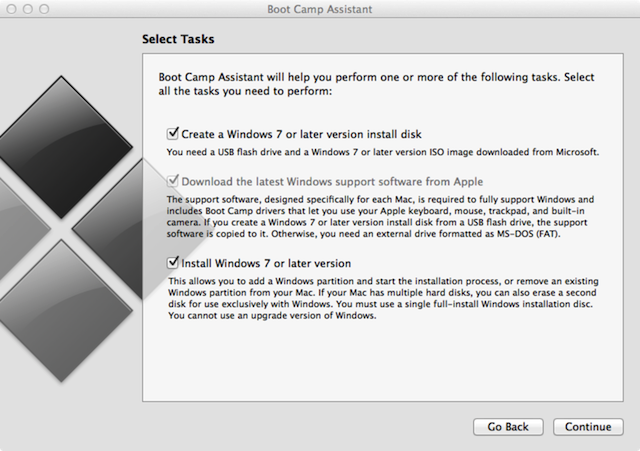
Step 2: Press Command+Space to bring up Spotlight. Search for and open Boot Camp Assistant. Press Continue once the application starts up.
Step 3: Check the following: Create a Windows 7 or later version install disk, Download the latest Windows support software from Apple and Install Windows 7 or a later version. Then proceed to ContinueBoot Camp will automatically detect the Windows 10 ISO placed on the Desktop. If it fails to do so, simply click Chooseand direct the software to the location of the ISO file.
Step 4: Verify all the settings and then click Continue. You’ll be presented with a warning; accept it and the software will start downloading the latest Windows support software, which usually entails the drivers and compatibility files.
Step 5: Boot Camp Assistant will redirect you to a screen which will allow you to choose the partition size for the Windows 10 installation. The slider will allow you to adjust the size. Windows 10 takes up around 20GB of install space, so ensure that you leave an ample amount of storage for files and program installs. Once set, this value cannot be changed. Once that’s done, click Install. Boot Camp Assistant will partition the Mac’s drive and restart the Mac automatically once it’s done.

How To Install Windows 10 On a Mac

Step 1: As the installation media has been created on the flash drive, the Mac will automatically boot with the USB to initiate the Windows 10 install process. Select the language, currency format, keyboard settings and time, then click Next. If due to some error, the Mac doesn’t automatically boot from the flash drive, don’t fret. You can boot from the flash drive by holding the Option key upon boot, and selecting the boot from flash drive option, once prompted.
Step 2: If you’re in possession of a Windows 10 key, enter it on the subsequent screen. If not, then simply skip the step. You’ll be prompted to confirm the edition of Windows, with a choice between Home and Pro. Select the version and press Next.
Step 3: The Windows install process will present you with all partitions, one of which will clearly be marked BOOTCAMP. This is the partition you need to select. Click it and press Format. Press OK on the warning prompt, followed by Next.
Step 4: The rest of the Windows install process is automatic. Depending on the capabilities of your Mac, the whole process may take 10 to 20 minutes to complete. Upon completion, the Mac will automatically boot to the Windows installation.
Step 5: The first login will be followed by a Boot Camp installation message. Complete the remaining Boot Camp installation process via the Wizard and then reboot the computer.
That’s it. Now, you’ll have a working dual-boot installation of both Windows 10 and Mac OS X on the same system. To choose which OS to boot into during the boot process, simply hold the Option key after the Apple startup sound. You’ll be presented with an option and can make your selection there.
In order to change the default boot OS, access the Boot Camp control panel in Windows or the Startup Disk in System Preferences on Mac OS.
To uninstall Windows and revert the changes, run the Boot Camp assistant in Mac OS X.

Monday, January 18, 2016

Apple iOS Lovers May Expect Li-Fi Technology on Future iPhones


To Know About This Article We Have To Know About Li-Fi 

What is Li-Fi technology?

Li-Fi technology is a ground-breaking light-based communication technology, which makes use of light waves instead of radio technology to deliver data.

Li-Fi can compensate as the radio spectrum becomes overloaded

The electro-magnetic spectrum
Using the visible light spectrum, Li-Fi technology can transmit data and unlock capacity which is 10,000 times greater than that available within the radio spectrum.
The visible light spectrum is plentiful, free and unlicensed, mitigating the radio frequency spectrum crunch effect.

The future internet

Li-Fi technology will in future enable faster, more reliable internet connections, even when the demand for data usage has outgrown the available supply from existing technologies such as 4G, LTE and Wi-Fi. It will not replace these technologies, but will work seamlessly alongside them.
Using light to deliver wireless internet will also allow connectivity in environments that do not currently readily support Wi-Fi, such as aircraft cabins, hospitals and hazardous environments.
Light is already used for data transmission in fibre-optic cables and for point to point links, but Li-Fi is a special and novel combination of technologies that allow it to be universally adopted for mobile ultra high speed internet communications.


Li-Fi is a communication technology which uses visible light spectrum and is also called Visible Light Communication (VLC)


Comparison of Li-Fi with Wi-Fi technology:
-> Wi-Fi uses radio spectrum whereas Li-Fi uses visible light spectrum (and some part of UV and IR spectrum)
-> Wi Fi can't penetrate into water whereas Li Fi can do with ease
-> Speed of Li Fi is 100x times faster than Wi Fi
-> Li Fi can be restricted within opaque structure (like house) but Wi Fi have access even outside opaque structure

 Can it replace Wi-Fi around the world?                  Wi Fi is a well established technology and it can only migrate if there are cheaper technologies available. Given the huge cost involved installation needed for Li Fi and technological compliance of most of the devices, its very difficult. Moreover Li FI being based on VLC can be susceptible to interference from other daily appliances which are also based on VLC. But as the world is moving towards more efficient, high speed and eco friendly communication technology, it becomes interesting if Li Fi can be used as complementary to Wi Fi.

These Are the main Reasons
"Apple's iOS code indicates Li-Fi wireless data may work on future iPhones "


Using pulses of light to transmit information, Li-Fi receivers (like a future iPhone, if Apple has its way) will take in that transmission, then translate it into an electric signal.
Because it uses light to send data, Li-Fi may be found in the connected home via accessories like light-bulbs.


Apple’s work with Li-Fi compatibility has been spotted in code for iOS 9.1, which simply notes Li-Fi capabilities. There’s no indication elsewhere that Apple is working with Li-Fi.
But, there’s indication Apple has had Li-Fi in mind for a while. AppleInsider points to a 2013 patent application for a device that sounds an awful lot like a Li-Fi transmitter.
While I’m not expecting Apple to include Li-Fi in the iPhone 7 — mainly because the technology is barely being tested in the real world — it could help push Li-Fi forward by making iPhones compatible.
Since iOS 9.1, the library cache files inside the OS mention "LiFi Capabilities" right next to other capabilities. With Li-Fi, the light from the source is received by a light sensor, which converts it into an electronic signal that is read by the phone. Don't expect Li-Fi to be offered in the Apple iPhone 7, however. The technology is still undergoing testing. 

Imagine a world where your phone's internet connection comes from the technology first displayed on December 31st, 1879 by Thomas Edison. We could be just a few years away from this becoming reality.